Home
GoBiz SaaS LogoGoBiz SaaS Logo
  • Home
  • Features
  • Plugins
  • Mobile AppNew
  • Pricing
  • Docs
  • Blog
  • Support
Home
GoBiz SaaSGoBiz SaaS
  • Home
  • Features
  • Plugins
  • Mobile AppNew
  • Pricing
  • Docs
  • Blog
  • Support
  • Join Affiliate Program

Ticketing System for GoBiz SaaS

Every customer question answered, even while you sleep

Give your customers one simple place to ask for help, right inside their dashboard. An AI assistant answers their questions in the chat in seconds, AI agents trained on your own FAQs reply to tickets day or night, and your team gets one inbox for everything else. No more missed WhatsApp messages, lost emails or customers left waiting.

AI replies 24/7OpenAI, Claude & GeminiChat bubble on every page
  • More Plugins
  • Buy Now
AI Assistant chats in the GoBiz SaaS Ticketing System: 30-day stats and customer questions that turned into tickets
Why Choose This Plugin?

Stop Losing Customers to Slow Support

Right now, customer questions arrive on WhatsApp, email and social media. Some get answered late, some get lost, and the same questions about billing, NFC cards and setup come in again and again. Every unanswered question is a customer quietly deciding whether to renew.

The Ticketing System puts every question in one place. Customers ask the AI assistant from a chat bubble without leaving their dashboard, and most simple questions are solved right there. Anything it cannot answer becomes a ticket for the right department, where an AI agent or your team replies. Nothing gets lost, and your team only handles what truly needs a person.

Outcomes:

⚡ Instant answers, day or night🤖 Questions solved before they become tickets📥 One inbox for everything else


Keep Customers Longer

Customers who get fast, clear answers stay and renew. Customers who wait for days look for another platform.

Respond in Seconds, Not Days

The AI assistant answers common questions straight away, and your team is emailed about the rest, so no customer sits waiting.

Grow Without Hiring

Handle more customers with the same team. The AI takes the repeat questions, your people handle the ones that need a human.

Core Benefits

Your Support Team, Powered by AI

Set it up once in a few minutes, and your customers get help the moment they ask.

AI Assistant in the Chat

Customers chat with your assistant in the chat bubble and get answers in seconds from your guides and FAQs. Starter questions get them going, and 'Talk to a person' turns the chat into a ticket.

AI Agents That Answer Tickets

Create agents like 'Maya from Support' with OpenAI, Claude or Gemini. Give them your instructions and up to 10 FAQ or policy files, and they reply to tickets the way you would.

You Stay in Control

Agents can reply on their own or write drafts your team approves. Set a daily message limit for the assistant, read every chat, and test both with 'Try it' before going live.

See it in action

A Closer Look at the Ticketing System

Real screens from the plugin: set up your AI, your team and your customers' chat in a few minutes.

An AI Assistant That Answers Before a Ticket Exists

Customers chat with the assistant in the chat bubble and on its own page. Pick OpenAI, Claude or Gemini, write its instructions, and see today's and the last 30 days' chats, questions, tickets and tokens at a glance.

AI Assistant settings with usage stats, AI provider, model and instructions

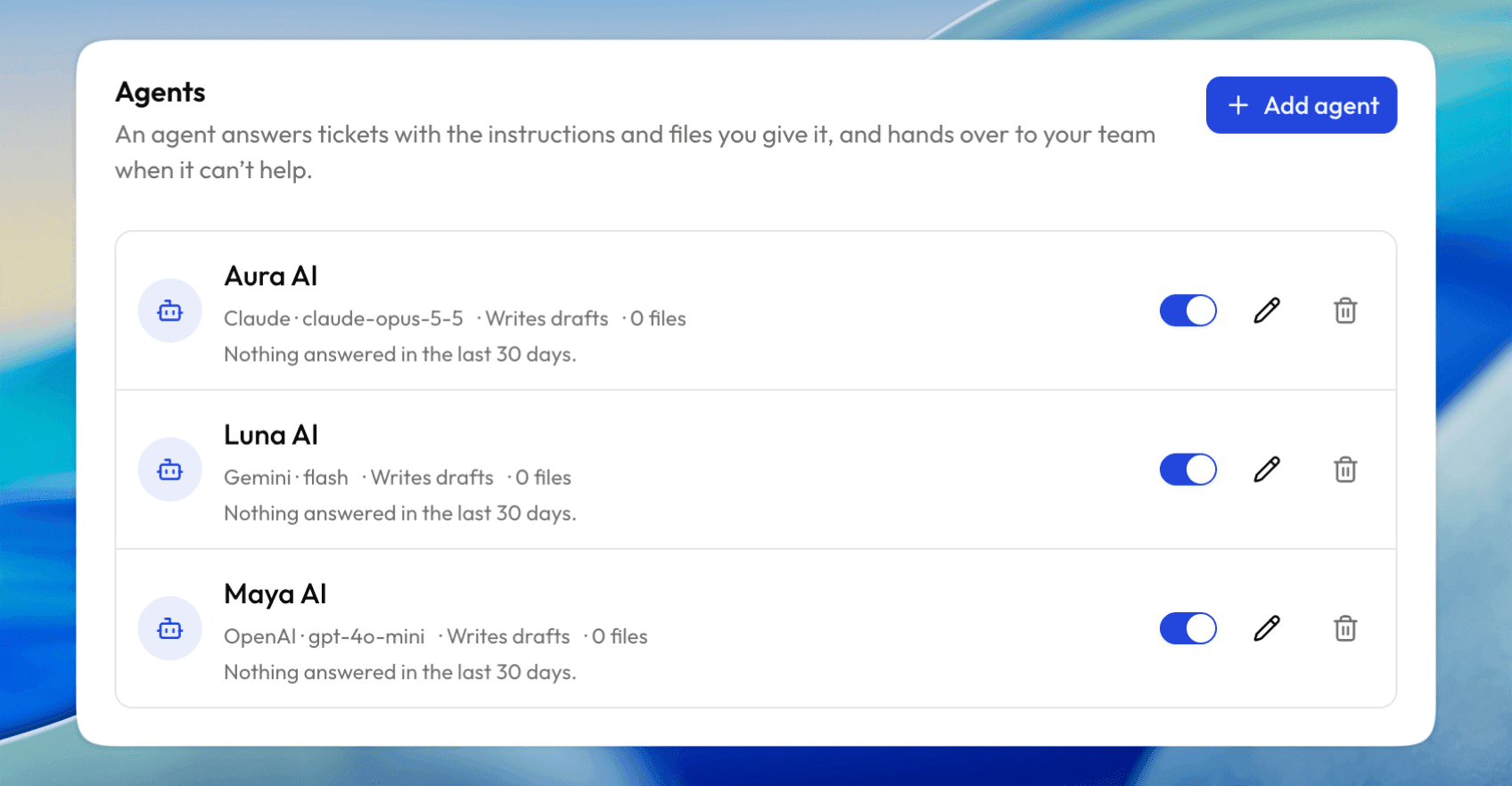
AI Agents That Reply to Tickets

Create as many agents as you need, each with its own AI model, instructions and files. Agents can reply on their own or write drafts for your team, and hand over when they can't help.

List of AI agents using Claude, Gemini and OpenAI models, each writing drafts

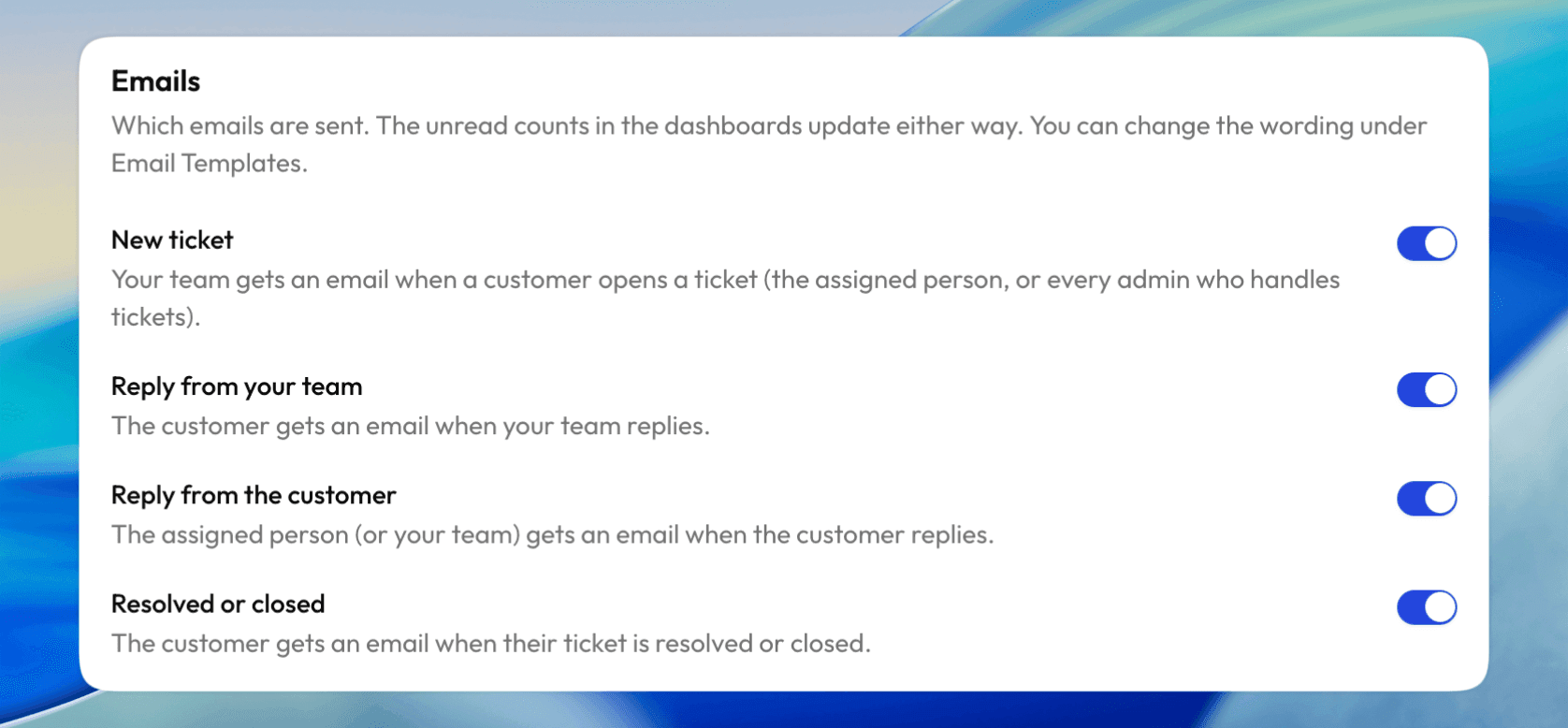
Email Alerts You Control

Your team hears about new tickets and customer replies, and customers hear about your replies and resolved tickets. Turn each email on or off and edit the wording in Email Templates.

Email notification settings for new tickets, replies and resolved tickets

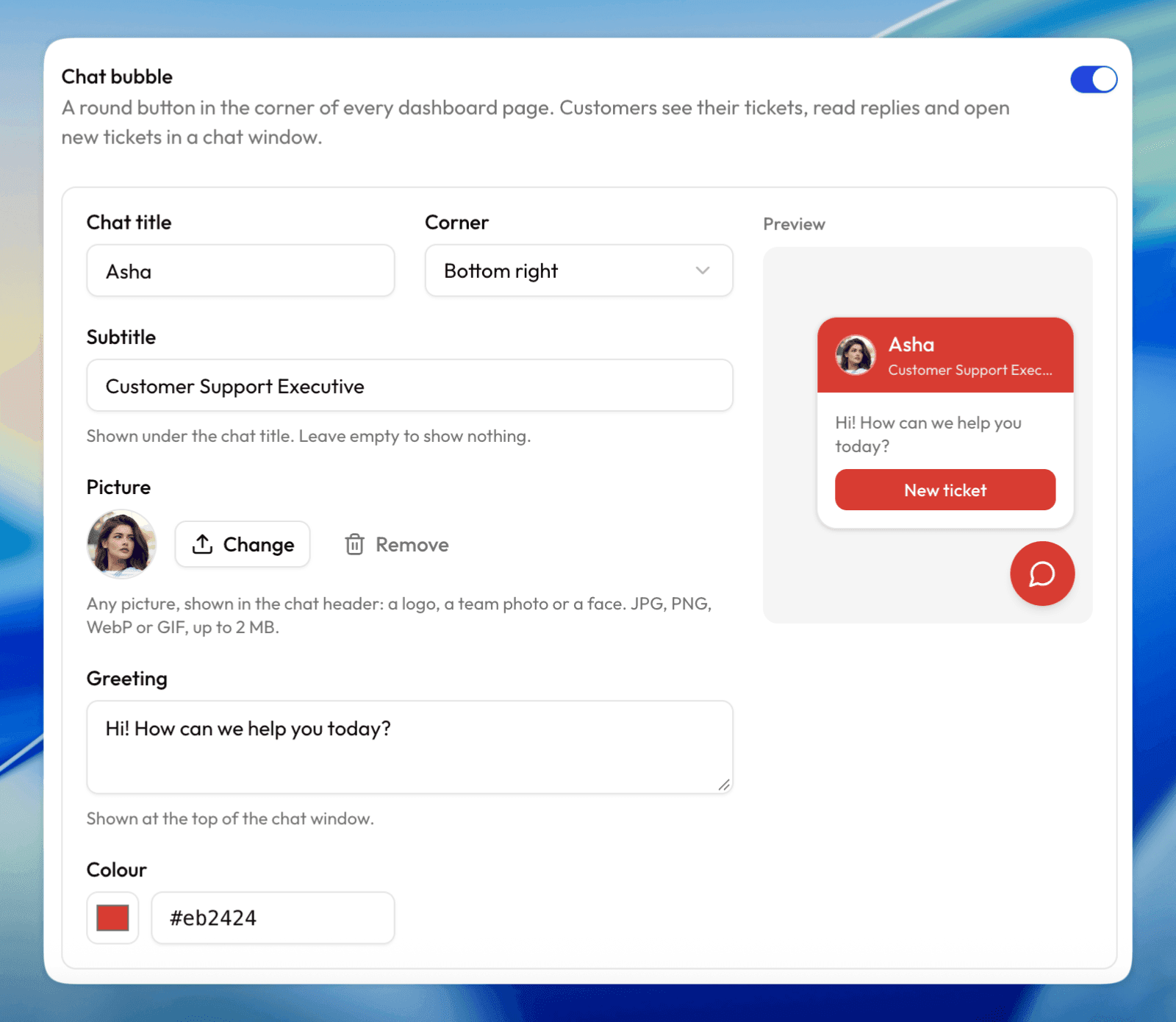
A Chat Bubble in Your Brand

A round button in the corner of every dashboard page. Set the name, subtitle, picture, greeting, colour and corner, and see a live preview as you go.

Chat bubble settings with title, subtitle, picture, greeting, colour and a live preview

Departments That Route Every Ticket

Create departments like General, Billing, Technical and NFC Cards. Customers pick one when they open a ticket, so it reaches the right person, and you choose the order they see.

Departments list: General, Billing, Technical and NFC Cards with ticket counts
🎯 Key Features

Everything You Need to Run Support

A complete help desk built into your GoBiz SaaS admin panel. No extra software, no per-agent fees.

One Smart Inbox

See tickets by status (Waiting for us, Waiting on customer, On hold, Resolved, Closed) and filter by department, priority or team member.

Departments & Routing

Create departments like Billing, Technical or NFC Cards. Each ticket goes straight to the right person.

Assign to Your Team

Assign tickets to team members and see who is handling what and when the last reply was sent.

Branded Chat Bubble

A chat bubble on every dashboard page. Set the title, picture, greeting, colour and corner, with a live preview.

Unread Reply Badge

A help icon in the dashboard header shows customers how many new replies are waiting for them.

Private Attachments

Customers and your team share screenshots and documents. Choose the file types and size limits. Only the customer and your team can open them.

Email Notifications

Emails for new tickets, team replies, customer replies and resolved tickets. Turn each one on or off and edit the wording.

Auto-Close Inactive Tickets

Answered or resolved tickets close by themselves after the number of days you choose, keeping your inbox clean.

Ticket Numbers & Priority

Custom ticket prefix like TKT-000123, a default priority, and an option to let customers reopen closed tickets.

Knows the Customer's Plan

The assistant can see the plan name, expiry date and usage limits, so it answers "when does my plan end?". Never payments or card content.

Chat History & Usage Stats

See every customer chat, and track chats, questions, chats that became tickets and tokens used, today and for the last 30 days.

Secure API Keys

Use your own OpenAI, Claude or Gemini key. Keys are stored encrypted and never shown again.

harilaltanur, GoBiz customer
joed777, GoBiz customer
atinakay, GoBiz customer
Rob02, GoBiz customer
promowebitalia, GoBiz customer
virtualbuddy, GoBiz customer
Trusted by 2.5K+ worldwide
4.87 / 5.0

Simple pricing with everything you need.

One-time purchase. Lifetime access.

Lifetime Access

Pay once, use forever

Secure & Safe

Your data is 100% safe

Trusted by Thousands

Join 2,500+ happy customers

Onetime

Helpdesk tools charge this every month. Pay once here.

Save $50 (51% OFF)

$99

$49

  • Add-on Plugin for GoBiz SaaS
  • Unlimited Tickets & Team Members
  • AI Assistant & AI Agents (OpenAI, Claude & Gemini)
  • Chat Bubble on Every Dashboard Page
  • Departments, Attachments & Email Alerts
  • Full Source Code Access
  • One time purchase
  • Lifetime access
Buy Now

Secure one-time payment

100% Secure

Secure payments with
128-bit SSL encryption

Reliable Support

We’re here to help
when you need us

Regular Updates

Get the latest improvements
and fixes

Full Source Code

Unencoded and
fully editable

Safe & Secure Payments

We never store your credit card information. All payments are securely processed through trusted payment providers and protected with 128-bit SSL encryption.

Accepted Payment Methods

Payment Methods

Powered by  

Lemon Squeezy
FAQ

Commonly asked questions

By offering concise and informative responses, this section helps users find solutions without the need to contact customer support, saving time

General

Installing and managing plugins is a simple process! Watch this video tutorial for a step-by-step guide here

Yes. The ticket inbox, departments, chat bubble, attachments and emails all work without any AI. The AI assistant and AI agents are optional and you can turn them on whenever you are ready.

The AI assistant chats with customers in the chat bubble and answers questions before a ticket is opened. AI agents work inside tickets: they reply to tickets (or write drafts for your team) and hand over to a person when they cannot help.

Only what you allow. With "Let it see the customer's plan" on, it sees the plan name, expiry date and how many cards and stores they use out of their limit. It never sees payments or card content.

The plugin has no AI fees. You add your own OpenAI, Claude or Gemini API key and pay the provider directly for what you use, usually a small amount per reply. You can also limit how many messages each customer sends to the assistant per day.

You decide what the AI may and may not say in its instructions, and it answers only from your own files. Agents can write drafts your team reviews instead of replying on their own. When the AI cannot help, the assistant suggests a ticket and agents hand over to your team.

API keys are stored encrypted and only their last four characters are ever shown. Attachments are private: only the customer and your team can open them.

Only for auto-closing inactive tickets. Add the one-line cron job shown in the plugin settings to your server, and tickets close by themselves after the number of days you choose.

No. Ticketing System for GoBiz SaaS is a premium add-on and is purchased separately for both Regular and Extended License holders.

🎉 Special Discount

Unlock 10% Savings

Use the coupon code below at checkout to enjoy an instant 10% discount on your purchase.

SAVE10

Copy the code and apply it during checkout.

Enter the coupon code during checkout to receive your discount.

Still havequestions?

Book a live demo and discover how to get the most value from GoBiz SaaS. Our team will guide you through every step.

GoBiz SaaS Logo

A powerful white-label SaaS platform for launching your own digital business card business with AI, NFC, QR codes, custom domains, and built-in monetization tools.

Join Affiliate Program

Featured on

  • #2 Product of the Week - Week 41, 2026
  • GoBiz - Digital Business Card Builder | Product Hunt
  • Featured on TinyShelf
  • Featured on CodeHype

Free Tools

  • vCard QR Code Generator
  • Business Card Generator
  • Visiting Card Maker
  • Business Card Size Guide
  • UPI QR Code Generator
  • WhatsApp QR Code Generator
  • WiFi QR Code Generator
  • Email Signature Templates
  • VCF to Excel Converter
  • CSV to VCF Converter
  • All Free Tools

Top Plugins

  • Ticketing System with AI
  • React Modern User Dashboard
  • GoBiz Rich UI Website Template
  • Directory System
  • Stripe Payment Gateway
  • Paddle Payment Gateway
  • Slack Notification
  • Zapier for GoBiz SaaS
  • All Plugins

Resources

  • Live Demo
  • Features
  • Customer Reviews
  • Release Notes
  • Downloads
  • Renew Support
  • Affiliate Program
  • Docs
  • Support Ticket
  • Suggest a Feature

Compare

  • GoBiz SaaS vs vCard SaaS
  • GoBiz SaaS vs Infy vCard SaaS
  • GoBiz SaaS vs 66vcard
  • GoBiz SaaS vs QuickvCard
  • All Comparisons

Products

  • GoBiz SaaS
  • GoBiz Mobile App

Latest Blogs

  • How to Start a Digital Business Card Business in 2026
  • All Blogs

Ask AI about GoBiz SaaS

ChatGPTClaudePerplexityGrok

For AI Agents

llms.txt·llms-full.txt·llms-docs.txt·Homepage (Markdown)·Sitemap

© 2021-present GoBiz. All rights reserved.

  • Terms & Conditions
  • Privacy Policy
  • Refund Policy
  • Support Policy
  • Cookie Policy
  • Affiliate Brand Guidelines

Made with love by NativeCode